
Amazon Merchant Fulfilled Handling Lead Time Days
Merchant Fulfilled Lead time is the amount of time between accepting an order and providing shipping information to prove that the order has shipped.
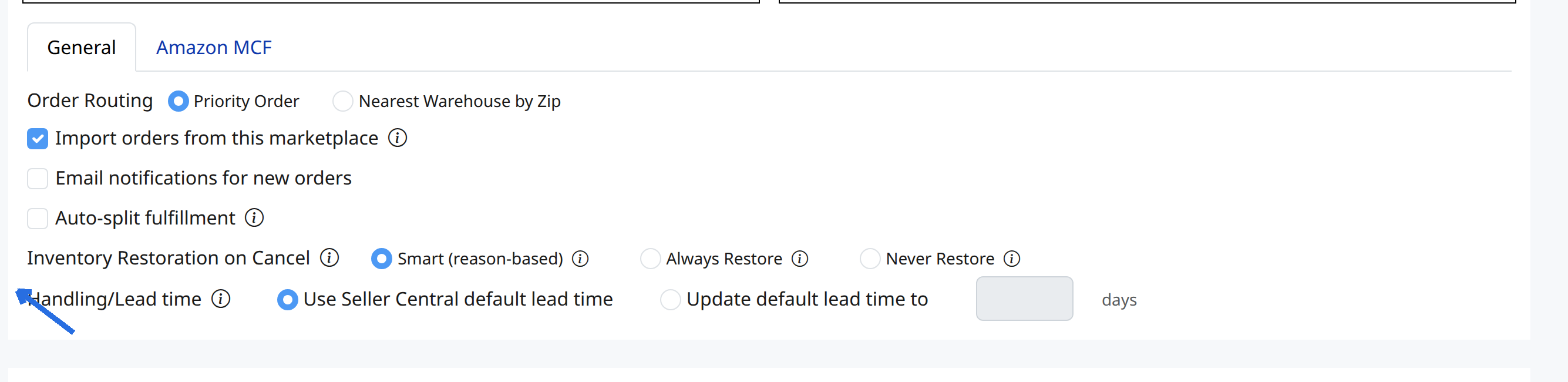
Set a custom Lead time for the Amazon integration
- Go to Channels > Connected channels
- Select Amazon
- In the General section, select Update default lead time to and enter the number of lead time days:
- Save changes
If you have individual items that take a little longer to ship, set the Merchant Fulfilled Lead time in the market listing.
Set a custom Lead time for an individual Amazon listing
- Go to Listings > All Listings
- Search for the listing > click the edit icon in the Amazon column
- In the Attributes section, click + Show more information
- In the MF Lead time to ship field, enter the appropriate number of days:

5. Save changes
This will only affect that specific listing and will override the Handling/Lead time days set in your Amazon integration settings.